Showing posts with label Samsung. Show all posts

Sunday, October 23, 2011

Samsung Transform, Hard Reset

Samsung Transform

Samsung Transform

Question : How to hard reset Samsung M920 Transform ???

Answer :
You should Press an hold the volume down button and the voice dialer, the while those two are pressed down press the power button. As soon as the device boots up let go of the power button while still holding the other two (2). This will get you where you need to, use the voice command to select data reset.

OR

Back to Menu -> Settings -> Privacy
Personal data :
1 Factory data reset

OR

You can use this method to hard reset your Samsung M920 Transform Android  : You Entered *2767*3855#. Warn : All data on your phone will be lost, so copy all to SIM Card or BackUp on your PC before full reset.

Case Closed
Read carefully the instructions written above to avoid mistakes during the process of a hard reset.
If this is helpful for you, please to distribute to your friend and this blog becomes your recommendations.
READ MORE >>> Samsung Transform, Hard Reset

Samsung Vibrant Black, Hard Reset

Samsung Vibrant Black

Samsung Vibrant Black

Question : How to hard reset Samsung T959 Galaxy S T-Mobile ???

Answer :
Samsung Vibrant 4G Galaxy S T-Mobile hard reset :
You can use this method to hard reset your Samsung Galaxy S : *2767*3855#. 
Warn : All data on your phone will be lost, so copy all to SIM Card or BackUp on your PC before full reset.

Case Closed
Read carefully the instructions written above to avoid mistakes during the process of a hard reset.
If this is helpful for you, please to distribute to your friend and this blog becomes your recommendations.
READ MORE >>> Samsung Vibrant Black, Hard Reset

Samsung Vibrant, Hard Reset

Samsung Vibrant


Samsung Vibrant

Question : How to hard reset Samsung Vibrant Android ???

Answer :
Samsung Vibrant 4G Galaxy S T-Mobile hard reset :

You can use this method to hard reset your Samsung SGH-i617 BlackJack ii : *2767*3855#. Warn : All data on your phone will be lost, so copy all to SIM Card or BackUp on your PC before full reset.
Case Closed
Read carefully the instructions written above to avoid mistakes during the process of a hard reset.
If this is helpful for you, please to distribute to your friend and this blog becomes your recommendations.
READ MORE >>> Samsung Vibrant, Hard Reset

Samsung BlackJack i607, Hard Reset

Samsung BlackJack i607
Question : How to hard reset Samsung SGH-i607 BlackJack ???


Answer : 
When the phone is powered off, press the UP Navigation key + END key and POWER key at the same time.

When Your Phone i607 asks, Press key 1 to reset and reboot then Y for YES, or any other key to cancel format.

Storage and Setting are wiped clean, eject the microSD memory card before doing a hard reset.

OR

Press *2767*3855# (+ center navigation key)

OR

You can reset your phone settings and clear all added data from memory.
How to Resetting the Phone ???
  1. On the HomeScreen, Press the START soft key,
  2. Select Settings -> More -> Security -> More -> Reset,
  3. Enter the reset password “the pass is 0000” and press the DONE soft key,
  4. Press the YES soft key to confirm.
The phone will be reset and reboot itself.

Case Closed
Read carefully the instructions written above to avoid mistakes during the process of a hard reset.
If this is helpful for you, please to distribute to your friend and this blog becomes your recommendations.
READ MORE >>> Samsung BlackJack i607, Hard Reset

Samsung BlackJack II, Hard Reset

Samsung BlackJack II

Question : How to hard reset Samsung SGH-i617 BlackJack II ???
Answer : Press and hold the UP Navigation key and then press the Power Button, and choose One (1) Ok.
Hmmm well...well..well let’s to method reset the handsets factory setting the Samsung SGH-I617, through the Phone MENUS.
To doing reset the handsets factory settings via menus, please follow the steps below:
Warn : This reset will be DELETE ALL added Data from the Handsets Memory.
  1. The Phone in standby mode, press the left soft key for start,
  2. Select Settings,
  3. Select More (G) to display more settings,
  4. Select Security (B),
  5. Select More (G) to display  more security settings,
  6. Select Reset (B) then press the left soft key for OK at the Alert Prompt,
  7. With Device highlighted, press the left soft key for YES to confirm the Device Reset.

OR

You can use this method to hard reset your Samsung SGH-i617 BlackJack ii : *2767*3855#. Warn : All data on your phone will be lost, so copy all to SIM Card or BackUp on your PC before full reset.

Case Closed
Read carefully the instructions written above to avoid mistakes during the process of a hard reset.
If this is helpful for you, please to distribute to your friend and this blog becomes your recommendations.
READ MORE >>> Samsung BlackJack II, Hard Reset

Samsung Captivate Black, Hard Reset

Samsung Captivate Black

Question : How to hard reset Samsung Captivate Black
Answer :
Factoty data reset of Samsung Captivate Black
You can reset your phone and sound settings to the factory default settings, how does one?
  1. From the Home Screen, touch -> Settings -> Privacy
  2. Touch Factory Data Reset, input your password, and then select YES to confirm.

The phone will be reset to the factory default settings automatically and when finished display the Home Screen.
Warn : Execute a Factory Data Reset will erase all data from your phone, like a system and application data, all setting, downloaded applications and including your Google Account. Excluding current system, bundled appications or file on your SD Card will not erase.

Android System Recovery of Samsung Captivate SGH-i897
Android System Recovery is used for Google updates but the average user will never need to perforn a system recovery. Inscription : If you entered this menu by mistake, use the Volume Up/Down keys to select reboot system now, then Press the POWER Key. Finally your phone will then continue to Boot Up.
Step into the i897 Android System Recovery mode, follow the instructions:
  1. Turn Off phone Conditions, press the POWER Key and VOLUME UP/DOWN Keys at the same time until the phone switches ON.
  2. Once the AT&T logo appears, release the POWER Key while continuing to press the VOLUME UP/DOWN Keys.
  3. Continue to press the VOLUME UP/DOWN Keys for at least 8 Seconds, until Recovery mode is launched and the Android System Recovery screen is displayed.
  4. Release the VOLUME UP/DOWN keys.
  5. The following options are available :

  • reboot system now : this option turns on your phone.
  • reinstall packages : this option allows you to apply updates your phone.
  • delete all user data : deletes all data from the phones.
  • delete cache data : this option allows you delete all cache data such as long files.

    6.  Use the VOLUME UP/DOWN Keys to scroll UP or DOWN, then use the POWER Key to make a selection.

OR

You can use this method to hard reset your Samsung Captivate Black : *2767*3855#. Warn : All data on your phone will be lost, so copy all to SIM Card or BackUp on your PC before full reset.

Case Closed
Read carefully the instructions written above to avoid mistakes during the process of a hard reset.
If this is helpful for you, please to distribute to your friend and this blog becomes your recommendations.
READ MORE >>> Samsung Captivate Black, Hard Reset

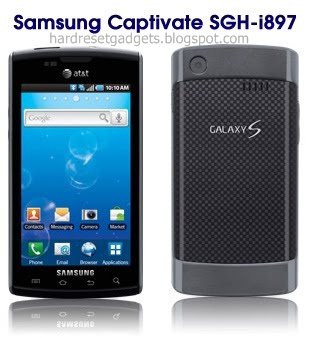
Samsung Captivate SGH-i897, Hard Reset

Samsung Captivate SGH-i897
Question : How to hard reset Samsung Captivate SGH-i897

Answer :
Factory data reset of Samsung Captivate SGH-i897.
You can reset your phone and sound settings to the factory default settings, how does one?
  1. From the Home Screen, touch -> Settings -> Privacy
  2. Touch Factory Data Reset, input your password, and then select YES to confirm.

The phone will be reset to the factory default settings automatically and when finished display the Home Screen.
Warn : Execute a Factory Data Reset will erase all data from your phone, like a system and application data, all setting, downloaded applications and including your Google Account. Excluding current system, bundled appications or file on your SD Card will not erase.

Android System Recovery of Samsung Captivate SGH-i897
Android System Recovery is used for Google updates but the average user will never need to perform a system recovery. Inscription : If you entered this menu by mistake, use the Volume Up/Down keys to select reboot system now, then Press the POWER Key. Finally your phone will then continue to Boot Up.
Step into the i897 Android System Recovery mode, follow the instructions:
  1. Turn Off phone Conditions, press the POWER Key and VOLUME UP/DOWN Keys at the same time until the phone switches ON.
  2. Once the AT&T logo appears, release the POWER Key while continuing to press the VOLUME UP/DOWN Keys.
  3. Continue to press the VOLUME UP/DOWN Keys for at least 8 Seconds, until Recovery mode is launched and the Android System Recovery screen is displayed.
  4. Release the VOLUME UP/DOWN keys.
  5. The following options are available :
  • reboot system now : this option turns on your phone.
  • reinstall packages : this option allows you to apply updates your phone.
  • delete all user data : deletes all data from the phones.
  • delete cache data : this option allows you delete all cache data such as long files.
    6.  Use the VOLUME UP/DOWN Keys to scroll UP or DOWN, then use the POWER Key to make a selection.

Case Closed
* Read carefully the instructions written above to avoid mistakes during the process of a hard reset.
If this is helpful for you, please to distribute to your friend and this blog becomes your recommendations.
READ MORE >>> Samsung Captivate SGH-i897, Hard Reset